SEO Saijo

AI Words Detector

Easiest way to spot AI words and phrases in webpages and Google Docs.

You know that feeling when you're reading something and it just... sounds like AI? Words like delve, multifaceted, and those telltale em-dashes everywhere. This free Chrome extension highlights them instantly on any webpage, so you can spot AI patterns before your readers do.

Works on Google Docs, WordPress, competitor sites, and pretty much anywhere.
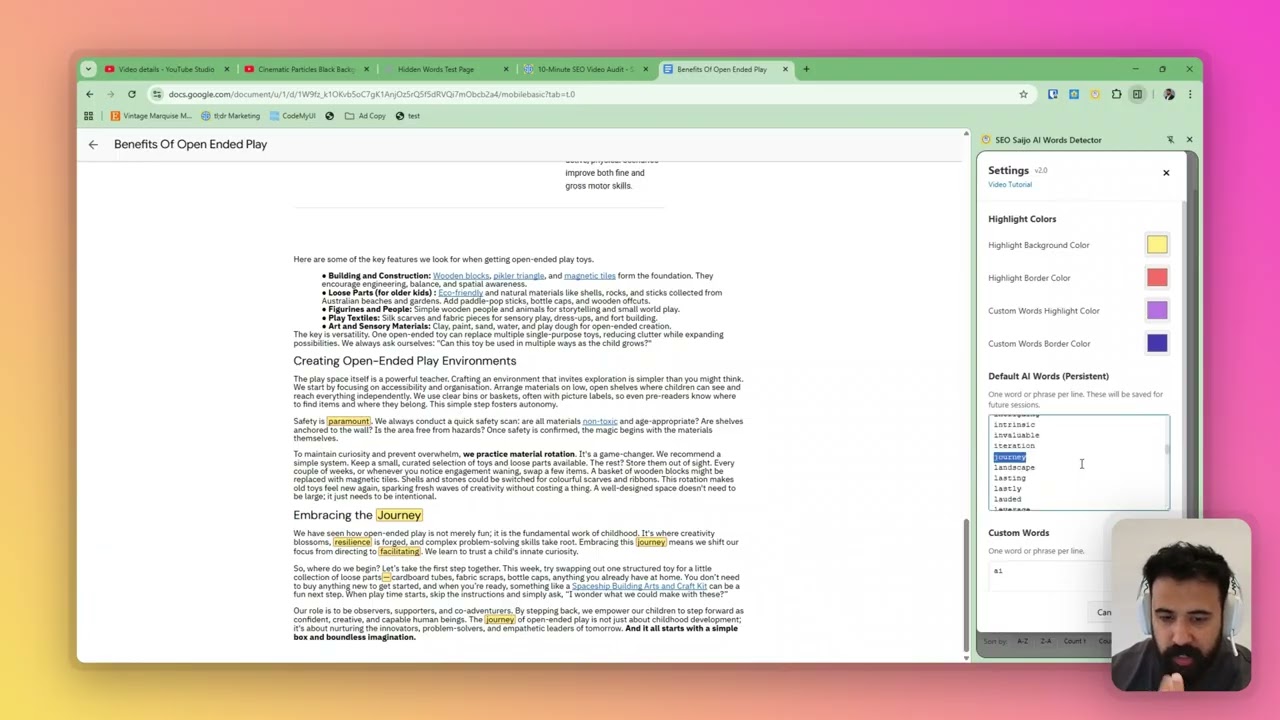
AI Words Detector Chrome Extension demo video

How to use AI Words Detector

  1. Install the extension from the Chrome Web Store
  2. Visit any webpage you want to analyse
  3. Click the extension icon to open the side panel
  4. Watch as AI-typical words get highlighted instantly
  5. Click any word in the panel to jump through occurrences
  6. Add your own custom words to track (like client no-go terms)

"Let me delve into this multifaceted topic it's truly paramount to unravel its intricacies."

Spot AI writing patterns instantly

AI-generated content has tells. Certain words appear far more frequently in LLM output than in human writing. Once you see them, you can't unsee them. This extension makes those patterns visible at a glance.

  • 250+ pre-loaded AI buzzwords like "delve", "tapestry", "nuanced", "multifaceted"
  • Catches em-dashes (—) which LLMs use excessively
  • Add your own words to track, like client-specific no-go terms
  • Works on Google Docs, WordPress, and tricky SPAs

Features that actually help

This isn't some bloated tool that tries to do everything. It does one thing well: highlight words you need to pay attention to.

Jump Navigation

Click any word in the sidebar to jump through each occurrence on the page. No more Ctrl+F hunting.

Two Colour Sets

Default AI words get yellow highlights. Your custom words get purple. Easy to tell apart.

Word Counts

See exactly how many times each flagged word appears. Sort by count or alphabetically.

Toggle On/Off

Turn individual words or all highlights on and off. Helpful when the page gets busy.

Default AI Words
delve ×12
multifaceted ×7
×23
Custom Words
guarantee ×3
lorem ipsum ×1

hidden-word-highlight

Catch hidden terms you can't see

AI-generated content sometimes hides in collapsed sections or elements with zero opacity. This extension detects those hidden terms and makes them visible, so you can find every instance of AI patterns; even the ones deliberately concealed.

  • Detects terms in collapsed or hidden HTML elements (display:none, zero opacity)
  • Click detected terms to highlight and scroll to the section containing them
  • Expand collapsed sections to reveal the actual hidden text in context
  • Never miss AI patterns buried in the DOM structure
  • Perfect for catching sneaky content that passes visual inspection

Perfect for

Whether you're editing your own content, reviewing client work, or analysing competitors, this extension saves you time.

Content Editors

Quickly spot AI-generated sections in articles before they go live. Make content sound more human without second-guessing every sentence.

SEO Professionals

Audit client sites and competitor content. See if that "hand-written" content they're paying for has suspicious patterns.

Agency Teams

Add client-specific no-go words like "guarantee" or brand terms they don't want used. Catch issues before the client does.

The usual suspects

The extension comes loaded with 250+ words and phrases that frequently appear in AI-generated content. Here's a sample of what it catches:

delve multifaceted tapestry nuanced the multifaceted nature unveil embark leverage synergy holistic pivotal seamless testament realm a stark reminder landscape unparalleled groundbreaking in today's world dive into shed light + 230 more...

You can add your own words or remove any defaults in the settings panel.

Ready to spot AI patterns?

Free forever. No account needed. No data collection. Just install and go.

Add to Chrome (Free)

Changelog

Track how the AI Words Detector evolved over time.

v2.0.1 January 2025
  • Link issue fixed
v2.0.0 January 2025
  • Complete UI redesign with side panel interface
  • Added word count display with sorting options
  • Jump navigation to cycle through word occurrences
  • Separate colour schemes for default and custom words
  • Master toggle to show/hide all highlights
  • Expanded default word list to 250+ terms
  • Added academic phrases commonly found in AI content
  • Improved Google Docs compatibility
v1.0 2024
  • Initial release with core highlighting functionality
  • Basic word detection for common AI terms
  • Em-dash detection